Photo organizing in Boston for families and small businesses.
Photo Organizing Co collects photos from your phones, computers, old drives and cloud accounts, removes duplicates, corrects dates and delivers one backed-up library on a drive.
In person in Greater Boston. Remote anywhere.
- IMG_4821.HEIC
- IMG_4821 (1).HEIC duplicate
- DSC00193.JPG wrong date
- Screenshot 2019-05-18 at 3.14.07 PM.png
- New Folder (3)/
- Copy of Photos Backup FINAL/
- Library/2019/
- 2019-05-18 Maya's Graduation/
- 2019-08-10 Cape Cod Trip/
- Library/2023/
- 2023-03-02 New Puppy/
- 2023-12-31 New Year's Eve/
Too many photos, in too many places.
Most collections end up the same way. Here's what gets fixed. If you'd rather start on your own, the guides cover getting photos out of iCloud, off old phones and back from memory cards.
- Your phone is full, and the storage bill keeps going up.Duplicates and near-copies are removed, and the whole library is saved to a drive you own, so the phone and the cloud don't have to hold everything.
- The same photos are on three phones, a laptop and two cloud accounts.Everything is gathered into one library, with each photo kept once.
- Old photos turn up in the wrong year.Dates are corrected, including scans, photos saved from messages and cameras whose clock was never set.
- There's a drawer of old drives, memory cards and CDs.Each one is checked and copied off while it still works. If a drive is physically failing, you'll hear that it needs a recovery lab first.
- Photos were deleted, or a card or drive stopped opening.Deleted, formatted or corrupted memory cards and drives that still run can often be recovered with software. A drive that clicks, grinds or won't spin needs a professional lab, and you'll be told so before any work is billed.
- A parent's collection has come to you.Decades of photos become one archive sorted by year and event, backed up three ways so it isn't lost again.
- You can't find anything.Every photo is filed into named events, like 2014/Cape Cod with Grandma, and the tags add-on makes it searchable by what's in the picture.
- Years of shoots sit in folders named final, final 2 and USE THIS.For photographers, bands and small businesses: one naming system across every shoot and a catalog your team can search.
How it works
- ConsultationA free 20-minute call about what you have, and a package recommendation.
- CollectionPhotos are gathered from your devices and accounts, in person or remotely.
- OrganizingDuplicates removed, dates corrected, everything sorted by year and event.
- DeliveryYour library comes back on a drive, fully backed up.
AI does the heavy lifting. A person checks the result.
If you've searched your phone for “dog” and found your dog, that's image recognition. The same kind of AI does the reading and comparing here, across every device at once.
- The details hidden in every photo. Each file records when it was taken and on which phone or camera. Software reads that for every photo and catches the wrong ones, like a camera whose clock was never set.
- Duplicates that don't match exactly. AI compares what's in the pictures, so copies, resized versions and bursts are found and the best one is kept.
- Events found by time and place. Photos taken close together are grouped into events, then named by hand.
- Search by what's in the photo. With the captions and tags add-on, AI suggests what each photo shows, such as beach or birthday cake, and every tag is checked by hand.
Flat-rate packages, priced by library size.
Sized by storage, which you can check on your phone, with no limit on how many phones, computers, drives or accounts it comes from. The total is agreed before work begins.
| Package | Details | Price |
|---|---|---|
| StarterA phone and a laptop | Up to 100 GB About 25,000 photos or 25 hours of phone video | $1,000about 4¢ a photo |
| FamilyA few phones and an old drive | Up to 500 GB About 125,000 photos or 125 hours of video | $2,000about 2¢ a photo |
| LegacyDecades of drives, or an estate | Up to 1 TB About 250,000 photos or 250 hours of video | $3,000about 1¢ a photo |
| CustomLarger archives and businesses | More than 1 TB Quoted after a look at what you have | Get a quote |
Every package is the full job, whatever the size: duplicates removed, dates corrected, every photo sorted into named events by year, a three-copy backup and delivery on a drive.
Add-ons
- Captions and tags. Every photo captioned and tagged, with each tag reviewed by hand, so you can search "beach 2014" or a name. +$400+$900 on Family, +$1,800 on Legacy
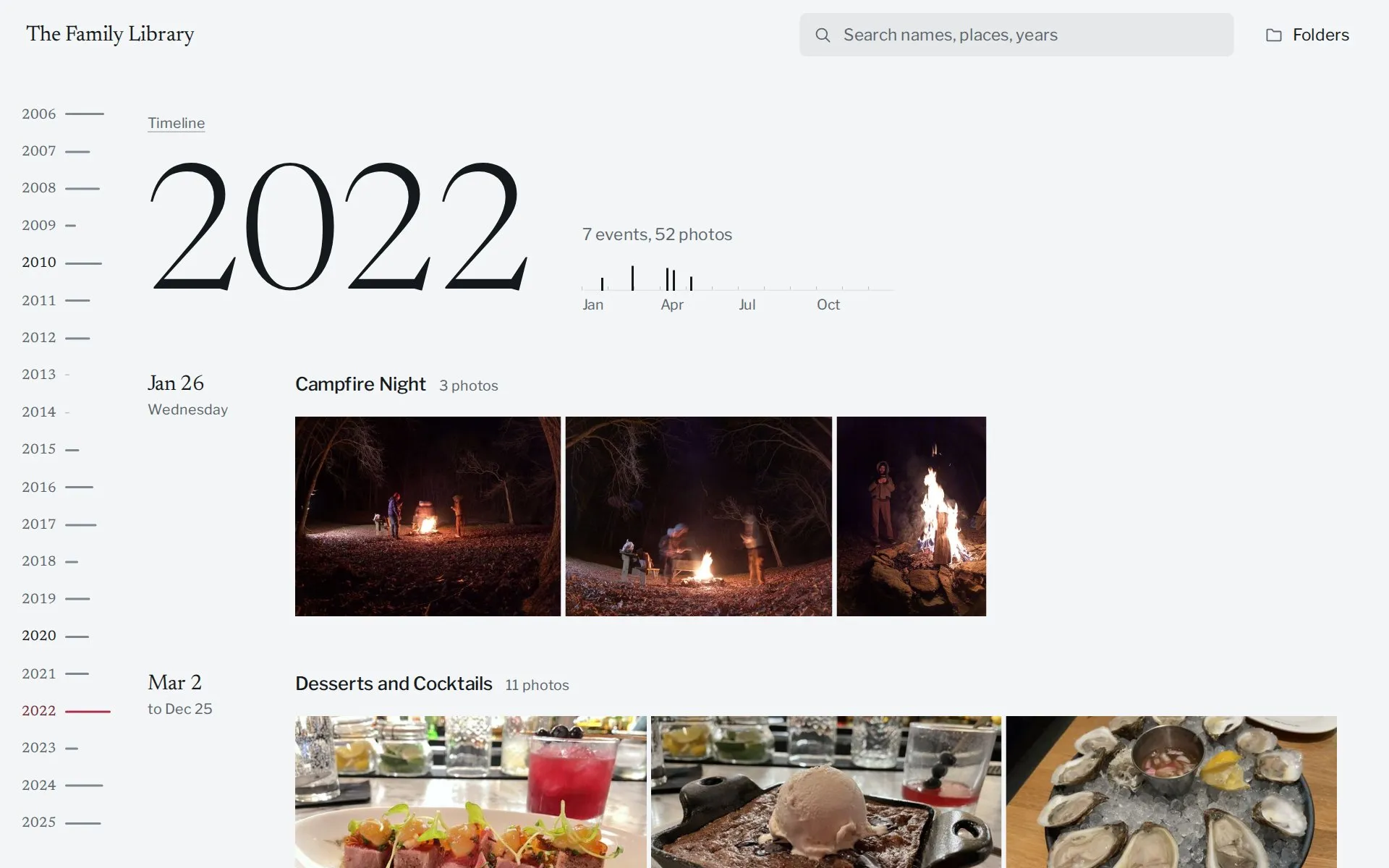
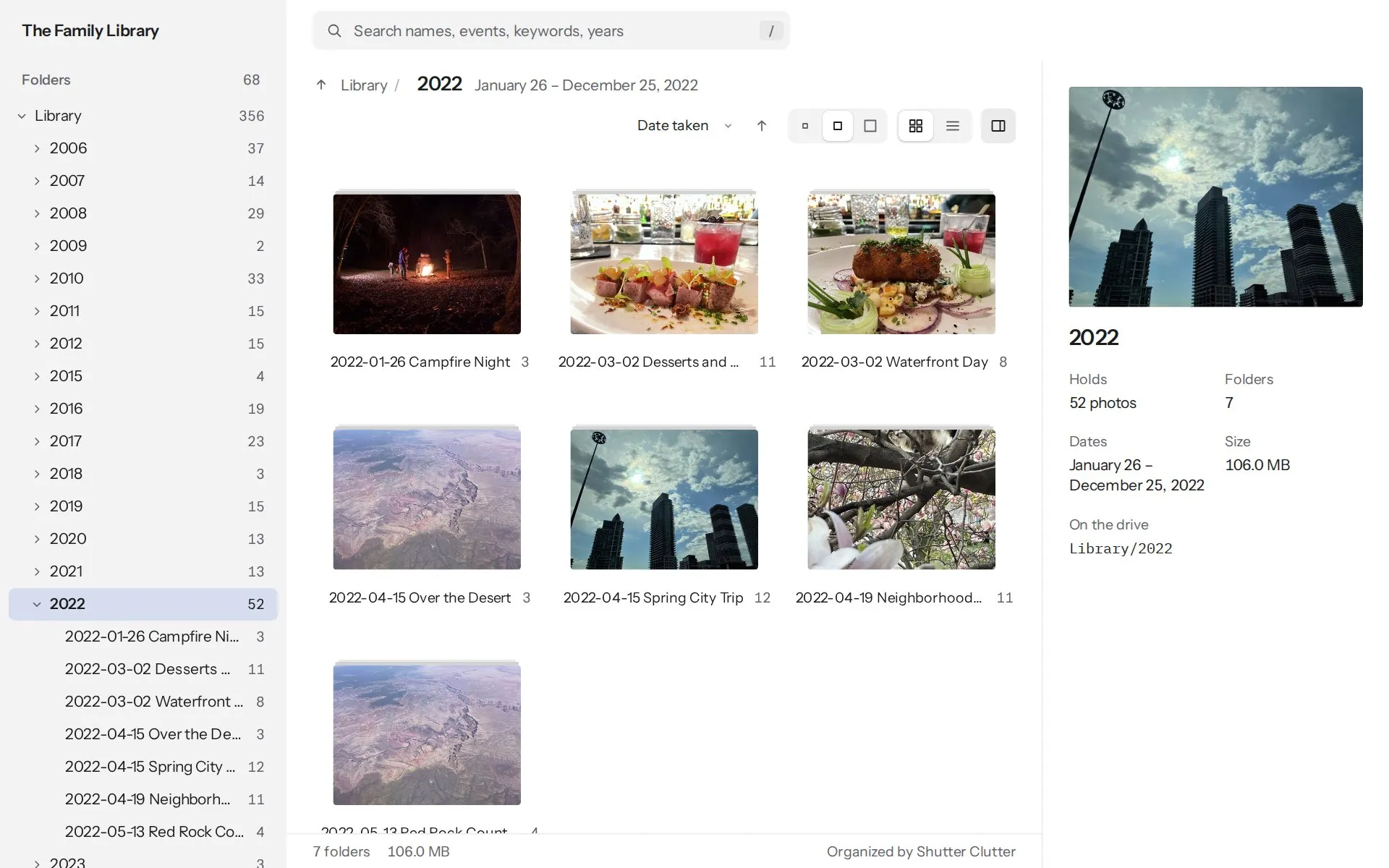
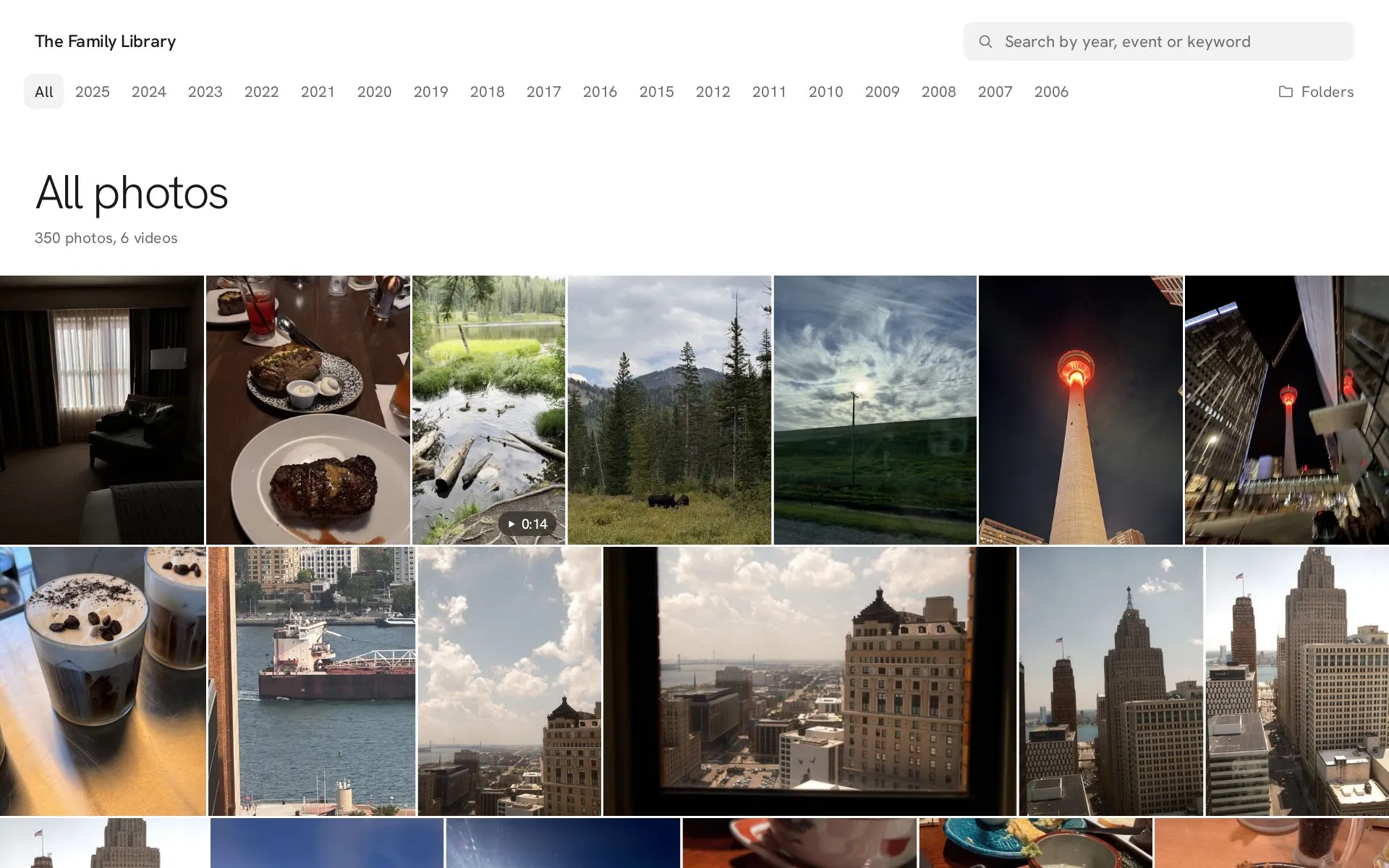
- Library viewer. A built-in viewer on the drive that opens like a website, offline, in the style you choose (shown below). $250
- Yearly tune-up. New photos added once a year and backups checked. $300
- Photo recovery. Photos recovered from a deleted, formatted or corrupted card or drive that still runs. Failing drives go to a lab. $110/hr
- Hourly. For smaller jobs. Two-hour minimum. $110/hr
Your library, ready to use.
Every drive holds your photos in standard folders, so you're never tied to one app. Add the built-in viewer for $250 and the drive opens like a website, offline, with nothing to install. It starts with your library's name and cover photo, in the style you choose.
- Keyword search. Find photos by year, event or keyword.
- File browser. Move through the library by year and event, the way it's stored on the drive.
- Media viewer. Open photos and play videos full screen, one after another.

Common questions
How long does it take?
It depends on the size of the library. The turnaround is written into the agreement before work begins, and your phones and computers are needed only during collection.
Who sees my photos?
Only me. Files are kept on an encrypted drive that stays in my possession, nothing is shared without your written permission, and working copies are deleted within 14 days of handoff.
What happens to my originals?
Nothing is deleted from your phones, computers or accounts. The work is done on a copy, and your originals stay untouched until you've checked the finished library.
Can you work with iCloud and Google Photos?
Yes, and with Dropbox and other cloud accounts. Photos are collected through a login made just for the job, which is removed afterward.
Can you recover deleted or lost photos?
Often. Photos deleted from a memory card, a card that was formatted by mistake, and a drive that still runs but won't open can usually be recovered with software, billed at the hourly rate. A drive that clicks, grinds or won't spin needs a professional data-recovery lab; you'll hear that plainly, and before any work is billed. Stop using the card or drive in the meantime.
How do I know how much I have?
On an iPhone, open Settings, then General, then iPhone Storage, and look at Photos. Google Photos shows its total on your Google account's storage page. On a computer, check the size of your photo folders. As a rough guide, 1 GB is about 250 photos or 15 minutes of phone video.
What if I have more than my package covers?
The size is measured during collection, after exact duplicates are removed, so you don't pay for copies. If it's over the limit, we agree on the change before any extra work starts.
Do you use AI?
Yes, to do the reading and comparing: checking every photo's date and camera details, finding duplicates and near-duplicates, grouping photos into events and, with the captions and tags add-on, suggesting what each photo shows. The models run on my own computers, your photos are never sent to an outside AI service, and every result is checked by hand.
Doesn't my phone already do this?
Partly. Your phone recognizes what's in the photos stored on that phone, inside its own app. Photo Organizing Co brings every phone, computer, old drive and account together, removes duplicates across all of them, corrects dates and saves the result as plain folders and files that any computer can open, so it doesn't depend on one company's app.
Do you scan prints or slides?
Not at the moment. Photo Organizing Co works with digital photos and videos. Prints you've already scanned are organized along with everything else.
Book a free consultation.
Email roughly how much you have, in GB or photos, and where it's stored. I reply within one business day to set up a 20-minute call.